Client Matching
Client Matching is an intelligent verification tool that identifies potential duplicate records before they are created. Because different carriers often report the same client with slight naming variations (e.g., "Doe, John E" vs. "John Doe"), this feature allows you to link these variations to a single master record using fuzzy logic.
How Client Matching Works
When you import a carrier statement via Create Policies, the software scans your existing database for names that are phonetically or structurally similar to the "new" names on your statement.
If a potential match is found, the system pauses to let you decide:
-
Match them: Create a Client Alias so the records stay unified.
-
Treat as New: Proceed with creating a brand-new client record.
Using the Matching Interface
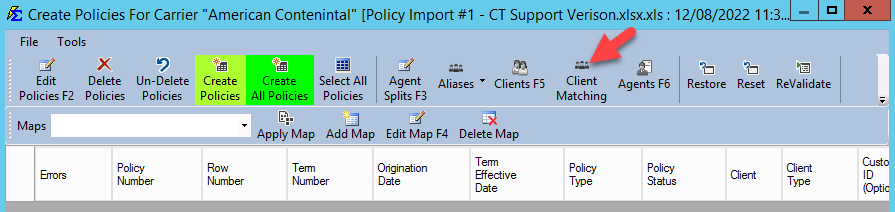
When potential matches are found, the Client Matching screen will appear during the import process.
1. Manual Selection (Individual Matches)
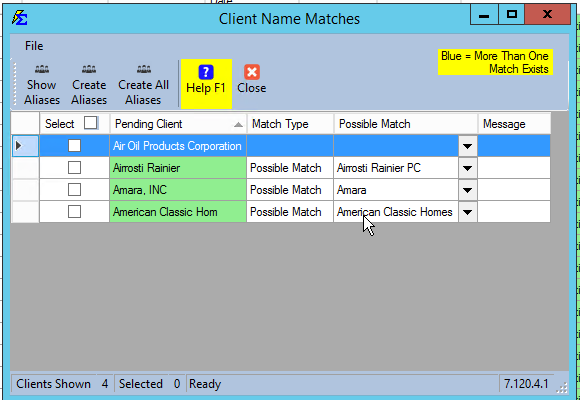
Review the list and use the checkboxes to approve specific matches.
-
Identify the match: Look at the "Possible Match" column to see which existing client the system recommends.
-
Create Aliases: Click this button to process only the rows you have checked.
2. Handling Multiple Possibilities (Blue Highlight)
If the software finds more than one existing client that might be a match, the cell will be highlighted in light blue.
- Select the correct record: Click the down arrow in the light blue cell to choose the correct existing client from the dropdown list.
3. Bulk Matching
If you have reviewed the entire list and are confident in the software's recommendations, click Create All Aliases to process every row at once.
The Result: Clean Data
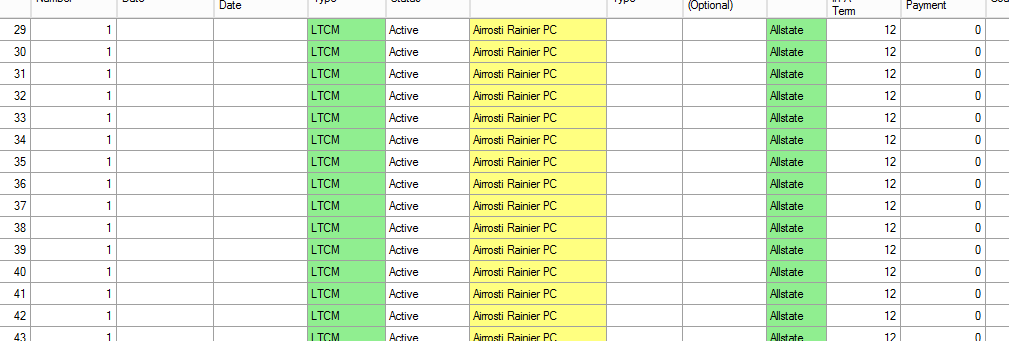
Once a match is confirmed, the system creates an Alias. In future imports, these clients will be highlighted in Yellow on the Create Policies screen, indicating that the alias was automatically recognized and mapped to the correct master name.
Example: You create an alias for "Airrosti Rainier PC." In every future carrier spreadsheet, the name "Airrosti Rainier" will be automatically converted to the master record "Airrosti Rainier PC."
Troubleshooting
Q: What if the system suggests a match that is actually a different person? A: Simply do not check the box for that row. The software will treat the name as a truly new client and create a separate record for them.
Next Step: Learn how to manually manage your naming variations on the Client Alias page.
Need help with database cleanup? Contact support@commission-tracker.com