Commission Per Payment (Manual Entry)
The Commission Per Payment field is used to manually define the exact commission amount you expect to receive from the carrier for each billing cycle. This method is used when you choose to calculate expected commissions externally rather than using the automated Carrier Commission Tables.
When to Use Manual Entry
While automated tables are recommended for scalability, manual entry is useful when:
-
One-Off Agreements: The policy has a unique commission structure that does not fit into a standard table.
-
Simplified Tracking: You prefer to estimate your commissions manually outside of the software.
-
Fixed Fee Policies: The commission is a flat dollar amount that never changes, regardless of premium fluctuations.
How it Works
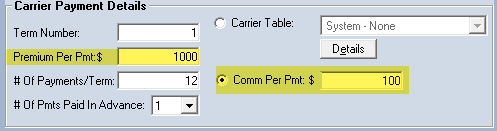
When you enter a value into the Commission Per Payment field, Commission Tracker bypasses its internal calculation engine. Instead, it simply multiplies this fixed amount across the policy's payment schedule.
Example: > If a policy has a premium of $1,000 and you know the commission is exactly $100 every month, you enter "$100" into the Commission Per Payment field.
Step-by-Step Instructions
- Navigate to the Policy screen.
- Locate the Commission Per Payment field.
- Enter the flat dollar amount you expect to receive per billing cycle.
- Save the policy.
- Click Create Payments to generate the schedule based on your manual figure.
What Happens When You Save
- A/R Accuracy: Your Accounts Receivable reports will now show this manual amount as the "Expected" commission for every month in the term.
- Agent Splits: The system will still apply your Agent Splits to this manual amount. For example, if an agent gets 50% of the commission, they will be scheduled to receive $50 of your $100 manual entry.
- Statement Reconciliation: When you Receive a Payment, you will compare the carrier's actual payment against this manual "Expected" figure.
Troubleshooting
Q: Why is my commission not calculating automatically? A: If there is a value in the Commission Per Payment field, it will override any Carrier Table you have selected. To return to automatic calculations, clear this field and ensure a Carrier Table is assigned.
Q: Can I change this amount mid-term? A: Yes, but you will need to click Create Payments again to refresh the schedule. Note that this may overwrite existing payment data, so use caution if you have already posted "Actual" commissions to that term.
Need help with manual commission setups? Contact support@commission-tracker.com