Annual Commission by Client
The Annual Commission by Client report provides a high-level, 12-month financial overview of the revenue generated by each client in your database. By itemizing payments into Commission, Bonus, and Override categories, this report allows you to identify your most valuable clients and monitor their revenue consistency throughout the calendar year.
When to Use This Report
Use this report when you need to:
-
Identify Key Accounts – Quickly see which clients are driving the highest annual revenue for your agency.
-
Monitor Revenue Stability – Spot gaps in monthly payments that may indicate a missed carrier statement or a policy lapse.
-
Audit Revenue Types – View a specific breakdown of standard commissions versus supplemental bonuses or overrides earned per client.
-
Analyze Retention – Evaluate the long-term value of a client relationship over a full 12-month cycle.
Generating the Report
This report is based on a calendar year cycle to provide a comprehensive annual view.
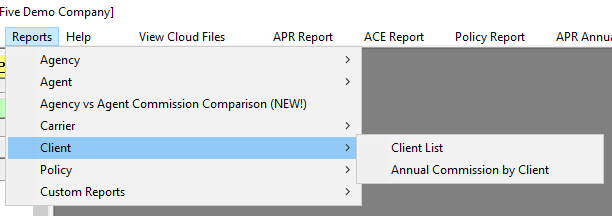
- Navigate to the Reports menu and select Client.
- Select Annual Commission by Client.
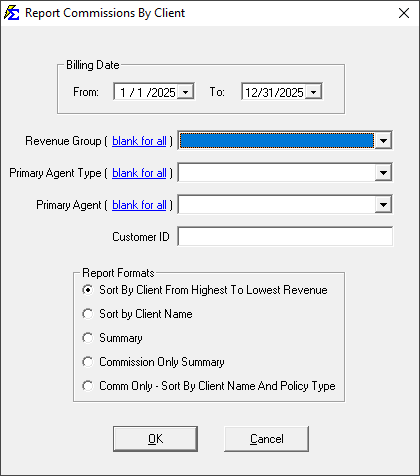
- Use the Year filter to select the specific 12-month period you wish to analyze.
Understanding the Report Layout
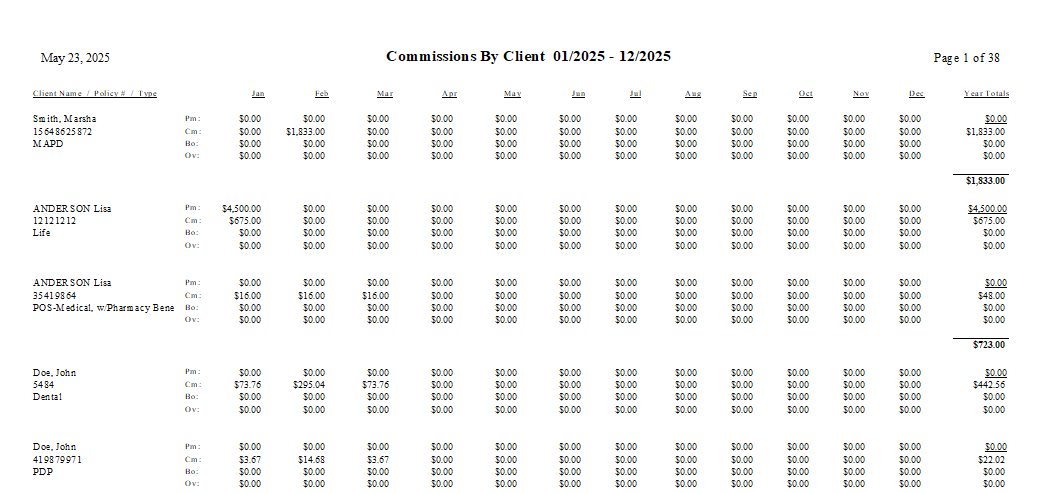
The report displays a horizontal 12-month grid for every policy associated with a client.
| Section | Description |
|---|---|
| Client Name / Policy # / Type | Lists the Client, the specific Policy Number, and the Line of Business (e.g., Health, Dental). |
| Jan - Dec | Displays the total revenue received for each month. Each month is sub-divided into three rows: Commission, Bonus, and Override. |
| Totals | Provides the annual sum for each of the three revenue types, followed by a grand total for the policy. |
Interacting with the Results
The report provides a granular look at the money flowing into the agency from each account.
- Client Summaries: If a client has multiple policies (e.g., Medical and Life), each policy will be listed individually under the client’s name, providing a total "wallet share" view of that account.
- Payment Itemization: You can easily distinguish between your base commission and any one-time bonuses or overrides received from the carrier for that specific client.
Troubleshooting
Q: Why does a client show $0 for certain months? A: This indicates that no payments were posted for that client during those months. This could be due to a carrier delay, a missed statement import, or a policy that was not yet effective.
Q: Can I see what was paid to my agents on this report? A: No. This report focuses strictly on the revenue paid to the agency by the carrier. To see agent-specific splits, please refer to the Agent Commission Earned Report.
Next Step: To see similar data grouped by Carrier rather than Client, visit the Commissions by Carrier report.
Need help with client revenue tracking? Contact support@commission-tracker.com