Create Carrier Commission Tables
Carrier Commission Tables are the rulesets used to calculate exactly what a carrier owes your agency. When creating a new policy, you will select the appropriate table for that specific product. Because commission rates typically vary by product (e.g., Dental vs. Life), you will usually create a separate table for each product line.
Once configured, Commission Tracker uses these tables to automatically calculate your Expected Commission each month, enabling you to identify underpayments or missing revenue.
Getting Started
To create a new table, you must first navigate to the specific Carrier entity.
- Select an existing Carrier from the Carrier List (or Create a New Carrier).
- Locate the Commission Tables section.
- Select the Type of commission table you wish to create based on your carrier contract.
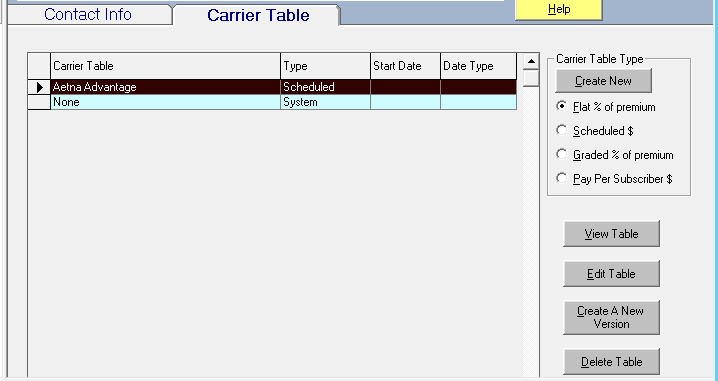
Supported Table Types
| Table Type | Commission Basis | Best Used For... |
|---|---|---|
| Flat | % of Premium | Standard percentage-based contracts (e.g., 10% of premium). |
| Graded | % of Accumulated Premium | Contracts where the rate drops as premium hits certain thresholds. |
| Scheduled | Fixed Dollar Amount | Fixed monthly fees or flat-rate commissions regardless of premium. |
| Pay Per Subscriber | # of Members (PEPM) | Group policies paid per head (e.g., $2.00 per member). |
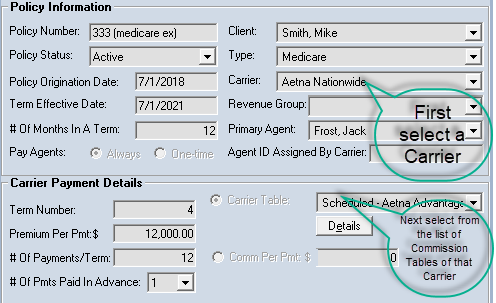
Alternatives to Automated Tables
If you do not wish for Commission Tracker to audit your statements or predict future revenue, you can bypass table creation:
- Zero Expectations: Set the Commission Table field to "System - None". The expected commission will always be zero.
- Manual Entry: Use the Commission Per Payment field on the policy screen to manually enter your expected amount, bypassing all system math.
Important Considerations
Historical Accuracy
Once a table is created and used for payments, avoid editing the rates directly. Instead, use Carrier Table Versions to handle rate changes. This ensures your historical records remain accurate while new payments adopt the updated rates.
Agent Payouts
The Carrier Table defines what the Agency gets paid. To define what the Agent gets paid, you must also configure the Carrier Table Agent Splits for that specific table.
Next Steps:
Need help determining which table type to use? Contact support@commission-tracker.com