Create New Client
In Commission Tracker, a Client represents the individual or organization (group) that purchases coverage from a carrier. You must establish a client record before you can Create a New Policy. A single client record can act as a hub for multiple policies, such as health, life, and dental.
Video Tutorial
If the video below does not play, please copy and paste this link into your web browser: https://www.youtube.com/watch?v=Yh4SYP8RSW8
The Client Profile
The Client screen captures high-level demographic data and reporting filters used to organize your book of business.
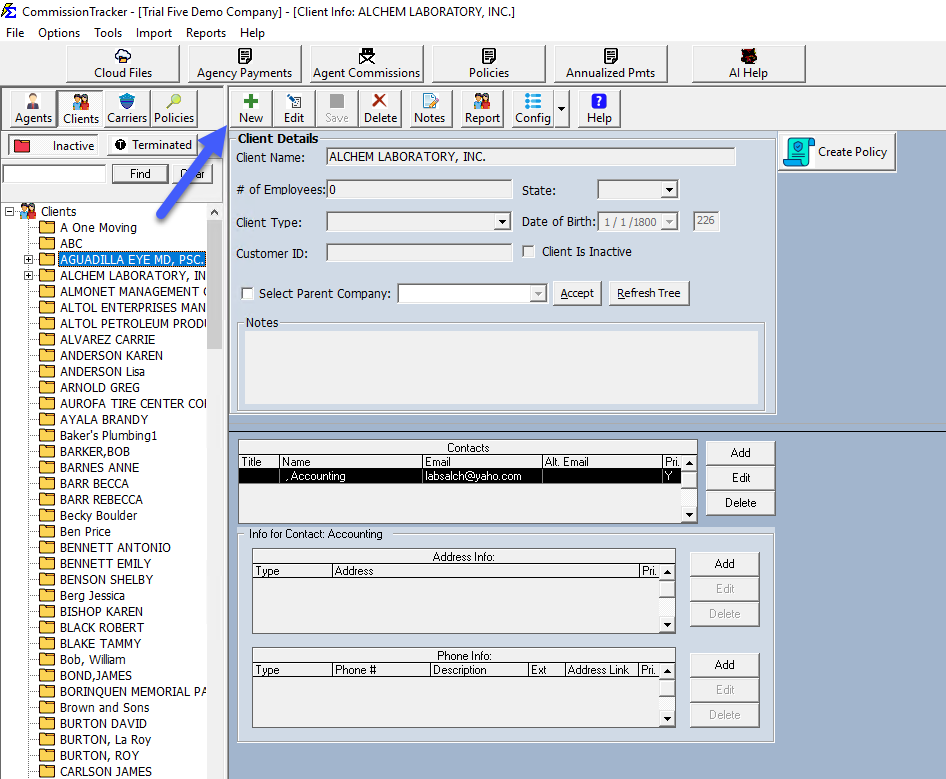
Key Fields
| Field | Description |
|---|---|
| Client Name | The primary name of the individual or company (Max 50 characters). |
| # of Emps | Used for group policies to track employee counts. This serves as a filter in various reports. |
| Client Type | A customizable filter created in the Tools menu to distinguish between "Individual," "Group," or other segments. |
| Cust ID | An optional field to store external identification numbers often found on carrier statements. |
| State | Essential for tax-time reporting and regional audits via the Commissions by State report. |
| DOB | The client's date of birth. The system automatically calculates and displays the client's current age. |
Managing Client Visibility
Inactive and Terminated Clients
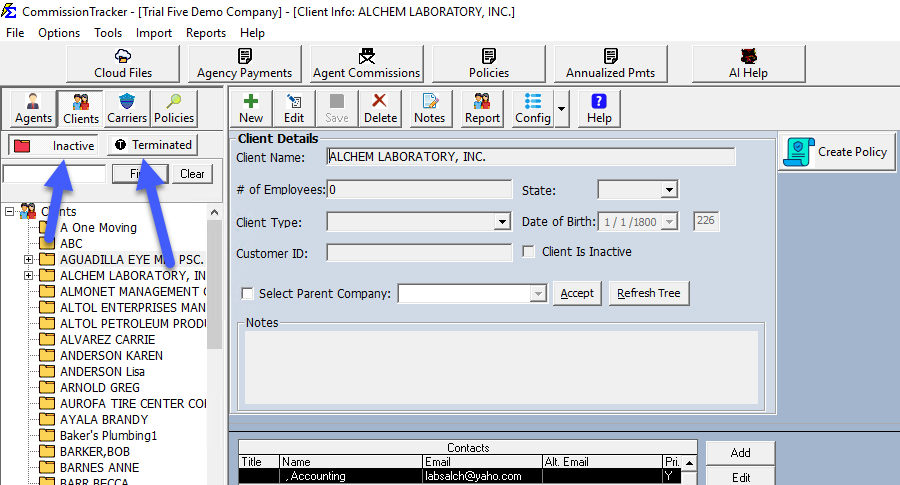
If a client no longer has active coverage, you can check the Client Is Inactive box. This allows you to hide them from your main navigation tree without deleting their historical data.
- To Hide: Click the button.
- To View: Unclick the button.
Important Organizational Tips
- Notes: Use the Enter/Show Notes section to log specific client interactions or unique administrative requirements.
- Hierarchy: If a client is a subsidiary of a larger organization, use the Parent Company / Sub Client feature to link them for consolidated reporting.
Troubleshooting
Q: Should I create a new client for every policy? A: No. If a client buys a second policy, find their existing record in the tree view and add the new policy under the "Policies" tab.
Q: Can I change a client's name after it's created? A: Yes. Updating the name on this screen will automatically reflect on all associated policies and future reports.
Next Steps:
Need help importing a large list of clients? Contact support@commission-tracker.com