Create New Policy Type
Policy Types are used to categorize the specific lines of coverage or products your agency sells (e.g., Dental, Vision, Group Health, Life). Assigning a Policy Type is required whenever you create a new policy, as it allows you to filter your book of business and revenue reports by product line.
Managing Policy Types
Policy Types are managed globally from the Tools menu. This ensures consistency across your entire database, preventing multiple variations of the same product name (e.g., "Health" vs. "Med").
Step-by-Step Instructions
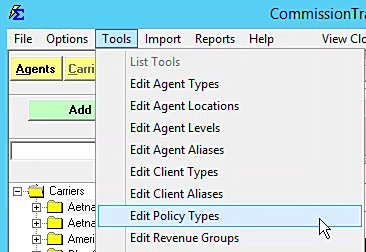
- Navigate to the Tools menu.
- Select Policy Types.
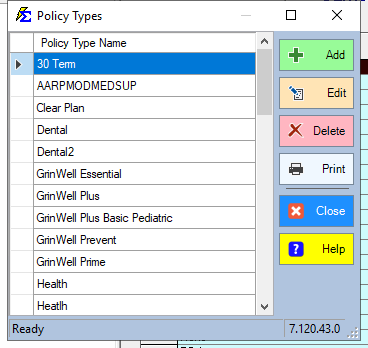
- To add a new type, click Add New (or click into an empty row).
- Enter a Policy Type Code (Maximum 30 characters).
- Click Save.
Strategic Categorization
When creating your codes, consider how you want your final reports to look. Clear, concise naming conventions help in generating clean Commissions by Carrier Table reports.
- Broad Categories: Health, Life, Dental, Vision.
- Specific Segments: Group Health, Individual Health, Medicare Supp.
Best Practices
- Consistency is Key: Before creating a new type, check the existing list to avoid duplicates.
- Maximum Length: Keep your codes under the 30-character limit to ensure they display properly on report headers.
- Editing Existing Types: You can rename a Policy Type at any time. The system will automatically update every policy currently linked to that code.
Troubleshooting
Q: Can I delete a Policy Type that is no longer in use? A: Yes, provided no active or historical policies are currently assigned to it. If policies are linked, you must first reassign them to a different type before the system will allow you to delete the code.
Q: Where does the Policy Type appear in my daily workflow? A: It is a mandatory field on the Create New Policy screen and is used as a primary filter in almost every Carrier and Client report.
Next Steps:
Need help organizing your product lines? Contact support@commission-tracker.com