List Of Create Policy Sessions
The List of Create Policy Sessions serves as a historical archive of every time the Create Policies utility was used. This screen allows administrators to track bulk imports, review who created specific batches of policies, and audit the data mapped from carrier statements.
Understanding the Session List
Every time you click the "Create Policies" button within the policy creation utility, a unique session record is generated. This ensures that you have a trail of where your automated data originated.
| Column | Description |
|---|---|
| Session ID | A unique system-generated number assigned to each bulk creation event. |
| Created Date | The timestamp of when the policies were officially committed to the database. |
| User | The login name of the staff member who performed the bulk creation. |
| Count | The total number of policies generated during that specific session. |
Session Preview and Audit
By selecting a session from the list, you can view a preview of the policies created during that event. This is useful for verifying that data was mapped correctly from the original carrier statement.
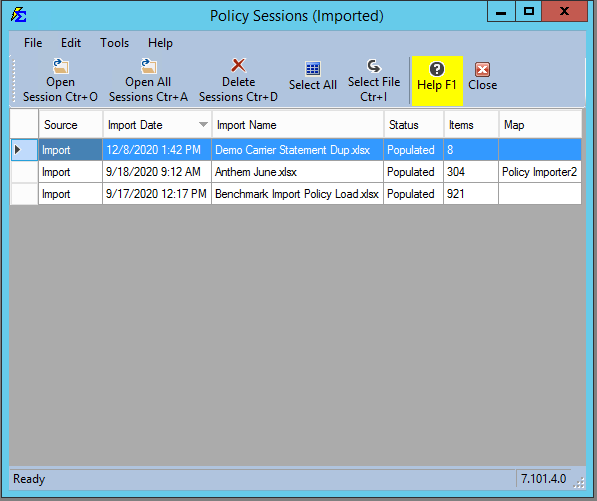
Key Uses for This Screen:
- Verification: If you notice a series of policies were created with the wrong Policy Type, you can identify the exact session and user involved to prevent future mapping errors.
- Import History: Match your commission statement imports to the actual growth of your book of business.
- Data Recovery: Locate policies that were recently added via automation to perform bulk edits or split adjustments.
Tips for Managing Sessions
- Filtering: You can sort the list by date or user to find specific import events quickly.
- Granular Review: Highlighting a session in the grid will often display the individual client names and policy numbers associated with that specific batch in the detail pane below.
Troubleshooting
Q: Can I "Undo" an entire session from this screen? A: No. Policies created via the session must be managed individually or through the Update Policies (by Carrier) tool. This screen is designed primarily for auditing and record-keeping.
Q: Why don't I see manual policies here? A: This list only tracks policies created through the Create Policies automation tool (usually triggered during Import Carrier Statements). Policies added manually via the Client screen are not part of a "Session."
Next Steps:
Need help auditing an import session? Contact support@commission-tracker.com