Database Backup
While Commission Tracker automatically backs up your data every 60 minutes as part of our core service, we provide an optional feature that allows you to request and download a local copy of your database. This serves as an extra layer of security and a "point-in-time" snapshot for your agency's records.
When to Manually Backup
We highly recommend utilizing the manual backup feature before performing major administrative tasks, such as:
-
Mass Imports: Importing a large volume of new policies or clients.
-
Bulk Deletions: Removing significant amounts of historical data.
-
Global Rate Changes: Updating several Carrier Tables at once.
How to Request Your Backup
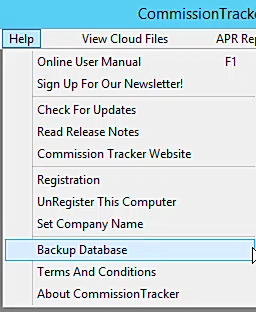
The backup utility is located under the Help menu.
- Navigate to Help > Database Backup.
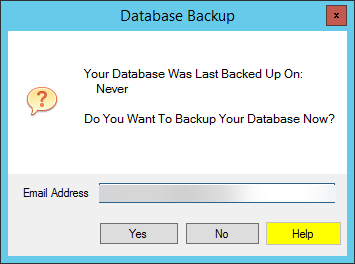
- Review the prompt, which displays the date and time of your last request.
- Enter your Email Address and click Yes.
Receiving and Storing the File
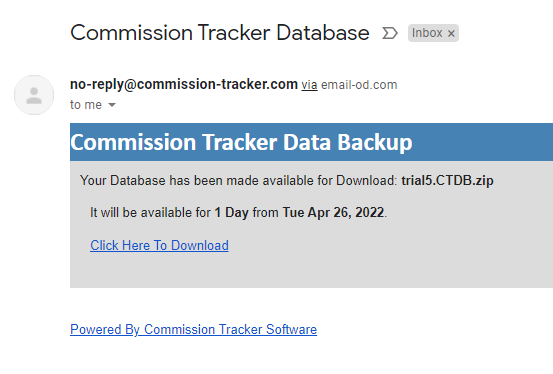
- Check Your Inbox: Within minutes, you will receive an email containing a secure download link.
- Note: If the email does not arrive, please check your SPAM or Junk folders.
- Download Immediately: The secure link expires 24 hours after the email is sent.
- Encrypted Security: The downloaded file is encrypted and cannot be opened by standard software. This is a security measure to protect sensitive client and agency data.
Restoring Data
In the event of a data emergency or a desire to roll back major changes: 1. Locate the encrypted backup file on your local machine. 2. Email the file to support@commission-tracker.com. 3. Our technical team will verify and restore the database to our Cloud Servers for you.
Best Practices
- Frequency: You can use this feature as often as you like. Most agencies perform a manual backup once a month or prior to monthly Statement Imports.
- Storage: Store your downloaded backup files in a secure, password-protected folder on your local network to maintain compliance and data privacy standards.
Next Steps:
Questions about your data security? Contact support@commission-tracker.com