Agent Commissions: Detail (By Carrier with Premium)
The Detail (By Carrier with Premium) report is designed for agencies that want to provide producers with a clear view of the premium volume they are generating, without disclosing the agency's total "gross" commission or overrides.
Report Purpose
This report format is ideal for agents who are paid based on a percentage of premium or who need to track their total production volume (Premium) alongside their actual earnings.
Key Features:
-
Premium Visibility: Lists the total premium amount for each transaction, allowing agents to verify that the correct rates are being applied to their sales.
-
Agency Privacy: The agency’s total commission and "House" splits are hidden. The agent only sees the premium and their specific payout.
-
Carrier Grouping: Transactions are subtotaled by insurance provider, making it easy to see which carriers are contributing most to the agent's premium volume.
Understanding the Layout
The report displays a granular list of payments, focusing on the relationship between the policyholder's premium and the agent's commission.
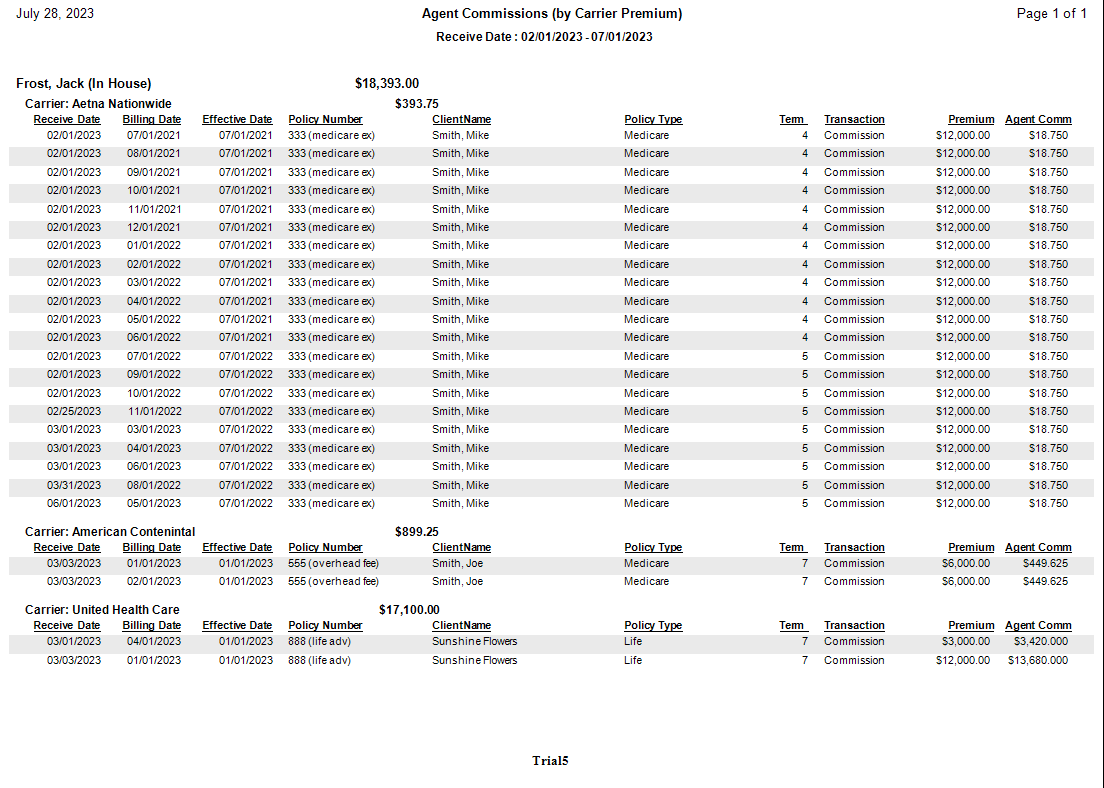
Core Data Points:
-
Premium: The total dollar amount the client paid to the carrier for that specific period.
-
Agent Split (%): The percentage of the commission (or premium) assigned to the agent.
-
Agent Commission: The final dollar amount the agent earned from that transaction.
-
Carrier Subtotals: A summation of both Premium and Agent Commissions for each specific carrier.
Comparison of Detail Reports
| Report Type | Shows Premium? | Shows Agency Gross? | Best Used For... |
|---|---|---|---|
| Detail (Standard) | No | Yes | Full transparency of agency revenue. |
| Detail (By Client) | Yes | No | Agents focusing on client-level auditing. |
| Detail (By Carrier w/ Prem) | Yes | No | Production tracking and carrier-level auditing. |
Tips for Administrators
- Validation: Use this report to help agents reconcile "Pay Per Subscriber" or "Graded" accounts where the premium amount is the primary driver of the commission calculation.
- Filtering: You can run this report for a single agent's pay period or in bulk for all agents during your monthly Payroll Run.
Troubleshooting
Q: Why is the Premium column showing $0 for some rows? A: This occurs if the premium was not entered during the Payment Posting or Statement Import process. For accurate reporting, ensure the Premium field is populated on all carrier payments.
Q: Can I customize the order of the carriers? A: Carriers are sorted alphabetically by default. To change the grouping, consider using the Detail (By Client) format if the agent prefers to see data by policyholder instead.
Need to adjust an agent's visibility settings? Contact support@commission-tracker.com