Agent Commissions: Detail (By Primary Agent)
The Detail (By Primary Agent) report groups commission earnings under the "Writing" or Primary Agent assigned to the policy. This format is particularly useful for agencies where secondary agents or managers receive overrides on policies written by a specific primary producer.
Report Purpose
This report provides clarity on which "Writing Agent" is generating the business that leads to a payout. While it shows the granular details of the commission, it maintains agency privacy by hiding the agency's total gross commission.
Key Features:
-
Primary Agent Grouping: All transactions are subtotaled under the name of the lead agent who wrote the policy.
-
Override Tracking: Ideal for managers or mentors to see exactly which of their team members' policies are currently paying out.
-
Agency Privacy: The agency’s total "gross" commission is hidden; agents only see their specific earnings and the policy details.
Understanding the Layout
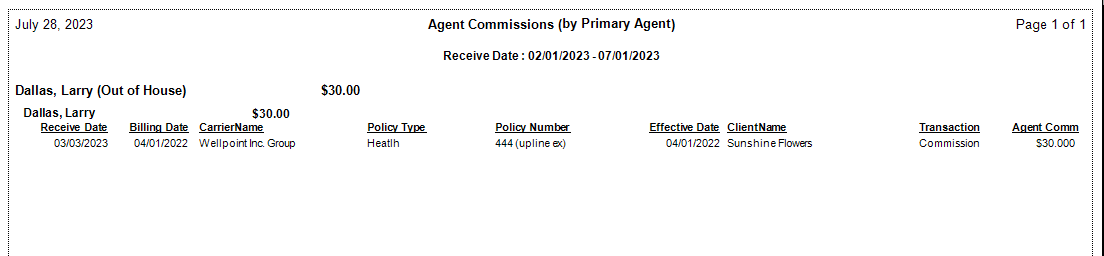
The report identifies the Primary Agent as the header, followed by a list of all policy payments where the recipient earned a commission.
Core Data Points:
-
Primary Agent: The "Writing Agent" listed on the Policy Information screen.
-
Client Name: The specific policyholder associated with the transaction.
-
Date Paid: The date the carrier payment was posted.
-
Agent Commission: The final dollar amount earned by the agent viewing the report.
-
Subtotals: A total dollar amount earned for all business written by each specific Primary Agent.
Use Cases
| Scenario | Why use this report? |
|---|---|
| Manager Overrides | A manager can see exactly how much they earned from policies written by "Agent A" versus "Agent B." |
| Shared Cases | If two agents split a case, this report helps the secondary agent track their earnings based on the lead producer's production. |
| Team Performance | Provides a quick visual of which primary producers are driving the most residual income for the recipient. |
Troubleshooting
Q: What if I am the Primary Agent? A: If you are the primary agent on your own policies, your earnings will simply be grouped under your own name.
Q: Why do some policies show an "Unknown" Primary Agent? A: This occurs if a policy was created without a Primary Agent assigned in the Policy Information section. To fix this, edit the policy and select a primary agent from the dropdown menu.
Q: Can I see the agency's total commission on this report? A: No. This specific format is "Agent-Facing," meaning it only shows the recipient's personal earnings to protect agency revenue data.
Need to change who is designated as the Primary Agent on a policy? Contact support@commission-tracker.com