Agent Commissions: Detail (Hybrid)
The Detail (Hybrid) report is the most transparent statement available for producers. It provides a comprehensive "dual-view" of commissions, showing the agent's earnings calculated as a percentage of the Client Premium and as a percentage of the Agency's Gross Commission.
Report Purpose
This report is ideal for agencies that operate on a "Full Transparency" model. It allows agents to see the entire financial flow of a policy—from the premium paid by the client to the total amount the agency received, and finally, their specific cut.
Key Features:
-
Dual Percentage Tracking: Displays the agent's split relative to two different financial benchmarks (Premium and Agency Revenue).
-
Comprehensive Auditing: Agents can verify that the agency was paid correctly by the carrier and that their split was applied accurately to that gross amount.
-
Granular Data: Includes Client Name, Policy Number, and Payment Dates for every transaction.
Understanding the Layout
The Hybrid report combines data points from several other report formats into a single, detailed grid.
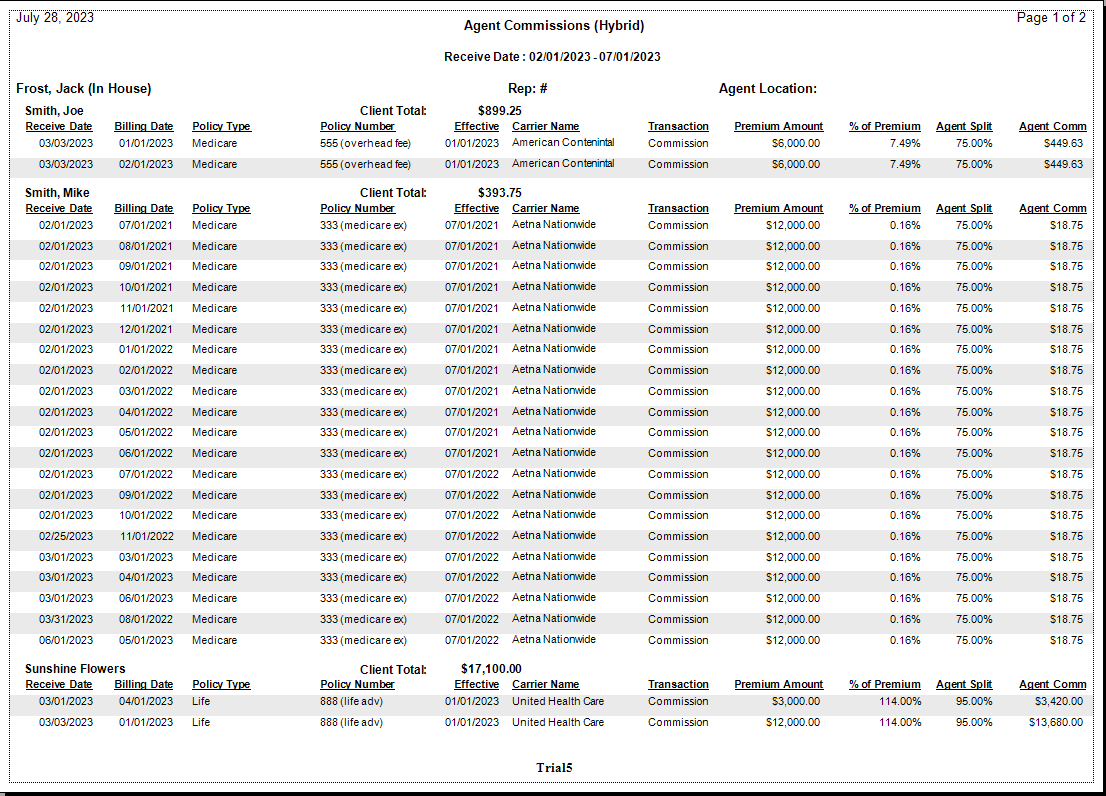
Core Data Points:
-
Premium: The total payment made by the policyholder to the carrier.
-
Agency Commission: The "Gross" amount received by the agency before any splits are paid out.
-
% of Premium: The mathematical relationship between the agent's earnings and the total premium.
-
% of Agency: The actual split percentage assigned to the agent (e.g., 50% of what the agency received).
-
Agent Commission: The final "Net" dollar amount paid to the producer.
Comparison Table
| Feature | Detail (Hybrid) | Detail (By Carrier) | Summary |
|---|---|---|---|
| Shows Premium | Yes | No | No |
| Shows Agency Gross | Yes | Yes | No |
| Shows Split % | Yes | Yes | No |
| Grouping | Alphabetical | By Carrier | None |
Use Cases
| Scenario | Why use this report? |
|---|---|
| Complex Split Audits | When an agent is paid a different percentage on the "first $X" of premium, this report helps them track the math. |
| High-Trust Partnerships | For agencies that want producers to feel like true partners by showing the "Top Line" agency revenue. |
| Discrepancy Research | If an agent's check is lower than expected, this report quickly identifies if the issue was the Carrier's payment or the Agent's split. |
Troubleshooting
Q: Why is the "% of Agency" different from what I expected? A: This usually occurs if there are Agent Advances being recouped or if the Carrier Table Agent Split was updated mid-month.
Need help explaining this report to your producers? Contact support@commission-tracker.com