Duplicate Policy Numbers
By default, most database systems require a unique identifier for every record. However, in the insurance industry, it is common for a single policy number to represent multiple lines of coverage or for different carriers to accidentally issue the same number.
Commission Tracker allows two or more policies to share the same Policy Number, provided they can be distinguished by at least one other key field.
Configuration: Enabling Duplicates
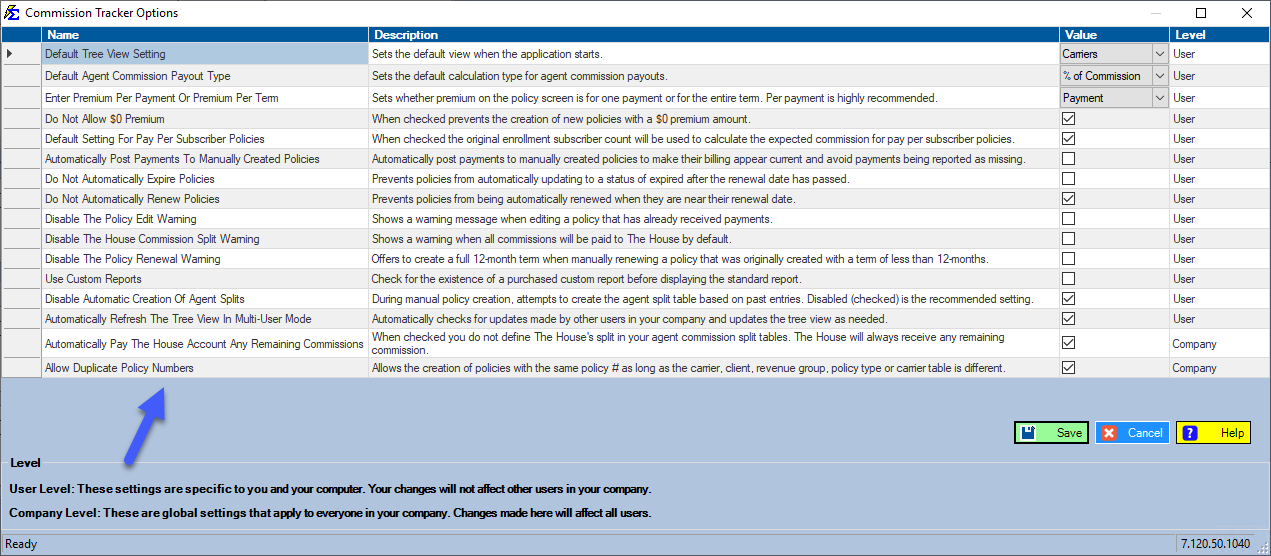
You can control whether your system allows duplicate policy numbers via the global settings.
- Navigate to the Options menu.
- Locate the "Allow Duplicate Policy Numbers" checkbox.
- Turned OFF: The system will block you from saving a policy if the number already exists elsewhere in the database.
- Turned ON: You can save identical numbers as long as one of the following fields is unique:
- Policy Type
- Client Name
- Revenue Group
- Carrier Name
- Carrier Table
Policy Matching during Imports
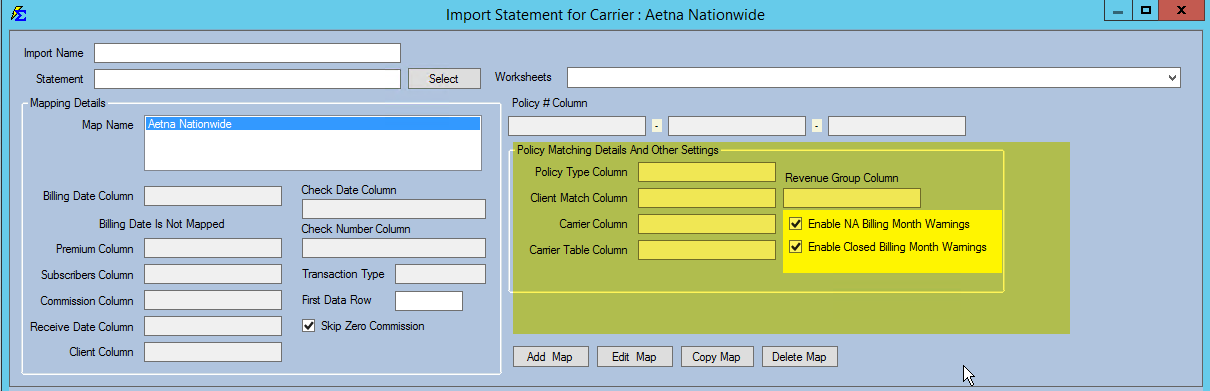
If you allow duplicate policy numbers, the system needs additional "logic" to determine which policy should receive a payment during the Import Carrier Statement process. Without this, the system won't know which of the two identical numbers to credit.
You must configure Policy Matching in the Import utility to look for secondary identifiers:
Real-World Example
Consider a scenario where a client has two policies with the same carrier and the same policy number, but they represent different coverage types:
-
Policy A: Policy #12345 | Type: Dental
-
Policy B: Policy #12345 | Type: Vision
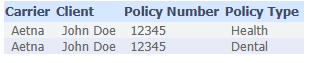
By mapping the Policy Type from your carrier statement during the import, Commission Tracker can successfully distinguish between the two and apply the payment to the correct record.
Best Practices
| Recommendation | Why? |
|---|---|
| Use Unique Types | If you have duplicate numbers, ensure your Policy Types are clearly defined (e.g., "Group Life" vs "Group Health"). |
| Check Client Names | Ensure the client name in the statement matches the client name in the database if using name-based matching. |
| Audit Imports | Regularly check for payments that failed to match due to ambiguous duplicate numbers. |
Troubleshooting
Q: I turned on the feature, but I'm still getting a "Duplicate Found" error. A: Check that at least one other field (Carrier, Type, Client) is actually different. If every field is identical, the system will still prevent the save to avoid creating a true "ghost" duplicate.
Q: What happens if the carrier statement doesn't provide a Policy Type? A: You may need to use Revenue Group or Carrier Table as your secondary matching criteria.
Need help setting up complex policy matching logic? Contact support@commission-tracker.com