Database Errors
On rare occasions, internal data files may become damaged due to network interruptions or hardware issues, resulting in a "corrupt" database. This is typically indicated by specific system messages.
Identifying Corruption Errors
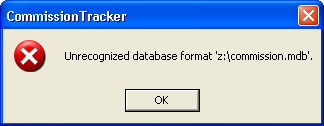
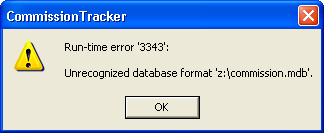
If you encounter either of the following messages, your database requires immediate attention:
-
"Unrecognized database format"
-
"Run-time error '3343'"
Resolution Steps
There are three ways to resolve a database corruption error, ranging from self-service to full technical restoration.
1. Manual Repair (Self-Service)
You can attempt to fix the file structure yourself using the built-in utility located in the Tools menu.
-
Navigate to Tools > Compact/Repair Database.
-
Follow the prompts to allow the system to reorganize and fix the data tables.
2. Technical Support Recovery
If the manual repair does not resolve the error, our technical team can attempt a deep-layer recovery of your specific file.
-
Contact support@commission-tracker.com immediately.
-
Provide a screenshot of the exact error message you are seeing.
3. Database Restoration
If the file is corrupted beyond repair, we will utilize our automated backup system to restore your data.
-
60-Minute Backups: We back up your entire database every 60 minutes.
-
Point-in-Time Recovery: We can restore your system to the most recent healthy state, ensuring minimal data loss.
Common Causes of Corruption
| Cause | Prevention Tip |
|---|---|
| Network Instability | Ensure a stable internet or RDP connection when performing large imports. |
| Improper Shutdowns | Always exit Commission Tracker using the "Exit" or "Close" commands rather than forcing the application to quit. |
| Interrupted Imports | Avoid closing the software while a Carrier Statement Import is currently processing. |
Important Safety Note
[!CAUTION] If you see a corruption error, stop entering data immediately. Continuing to work in a corrupt database can lead to further data loss. Run the Repair utility or contact Support before proceeding with your daily workflow.
Is your system currently showing an error? Contact support@commission-tracker.com