Flat Carrier Table
The Flat Carrier Table is the most common method for calculating carrier commissions. It allows you to define a set commission percentage based on the age of a policy (the Policy Term).
Instead of building complex formulas, you simply enter your percentages into a simple grid. This ensures your Expected Commission matches what the carrier is likely to pay as a policy matures.
Basic Term Logic
In a Flat Table, the columns represent the Policy Term #.
-
Column 1: Represents the first year (New Business).
-
Column 2+: Represents renewals.
Scenario: 15% Initial / 5% Renewal
In this example, the carrier pays a higher percentage for the first term and a lower percentage for all subsequent renewals.
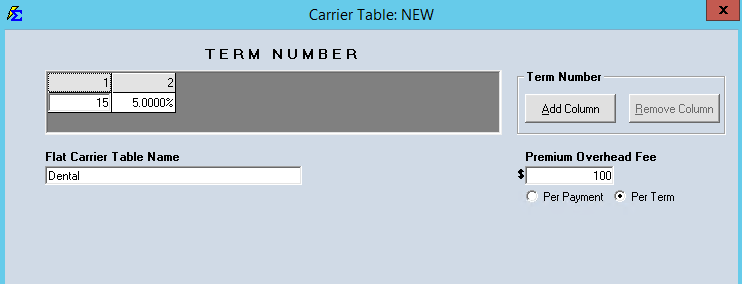
| Policy Term | Actual Premium | Calculation | Expected Commission |
|---|---|---|---|
| Term 1 | $100.00 | $100 \times 15\%$ | $15.00 |
| Term 2 | $100.00 | $100 \times 5\%$ | $5.00 |
Advanced Term Scaling
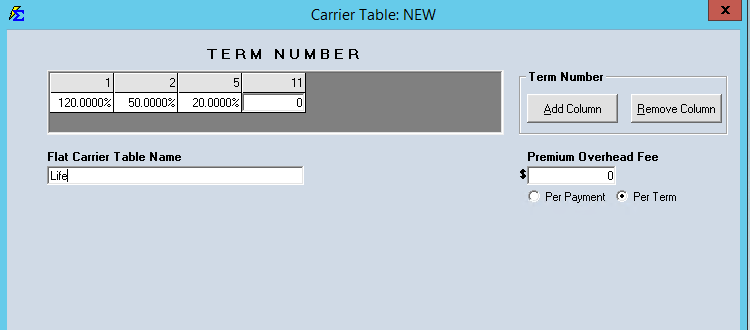
You can define up to 10 distinct term ranges if a carrier uses a more complex "step-down" schedule. If a carrier stops paying commission after a certain number of years, you can enter 0% for the remaining terms.
Example Setup:
-
Term 1: Pays 120% of premium.
-
Terms 2–4: Pays 50% of premium.
-
Terms 5–10: Pays 20% of premium.
-
Term 11+: No commission is paid.
Key Benefits
-
No Formulas Required: Simply enter the percentage for each term year.
-
Automated Transitions: As you Renew Policies and the Term Number increases, Commission Tracker automatically switches to the next column's percentage.
-
Precise Projections: Helps you identify underpayments by comparing the Expected Commission from the table against the Actual Commission received.
Troubleshooting
Q: Why is my commission calculating at the Year 1 rate for a renewal? A: Check the Term # on the Policy Information screen. If the policy was not advanced to Term 2 during the renewal process, the system will continue to use the Column 1 percentage.
Q: What happens if the policy reaches Term 11 but I only have 10 columns? A: The system will continue to use the percentage defined in the last available column (Column 10) unless that column is set to 0%.
Need help setting up a specific carrier's schedule? Contact support@commission-tracker.com