Logging In & Security
Overview
Accessing Commission Tracker for the first time requires using default credentials. Once logged in, we highly recommend setting up individual user accounts to maintain security and audit trails.
🔑 First-Time Login
When you launch the application for the first time, use the default administrative credentials.
- Default Username:
admin - Default Password:
admin
Note: Both the Username and Password are case-sensitive. Ensure your Caps Lock is off before proceeding.
⚙️ Managing Users & Passwords
After your initial login, you should configure your own secure credentials.
- Navigate to Tools → System Options.
- When prompted for the System Options password, enter the default:
password. - Create your new Usernames and Passwords in the security tab.
🖥️ Troubleshooting: The "Black Screen" Issue
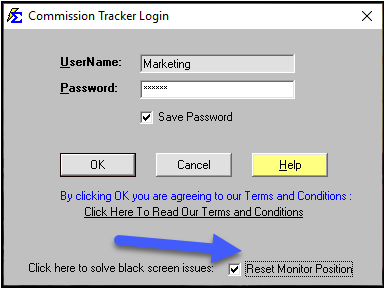
In some multi-monitor setups, the application may attempt to open on a screen that is no longer connected, resulting in a black or empty screen.
- ✅ The Fix: Check the box labeled "Reset Monitor Position" on the login screen.
- What it does: This forces the application window back to your primary monitor.
⚠️ Emergency Password Reset
If you have forgotten your password and are locked out of the system, you can perform a factory reset of the security database.
CRITICAL: This action will erase ALL existing usernames and passwords. Only the default
admin/adminlogin will remain.
How to Reset:
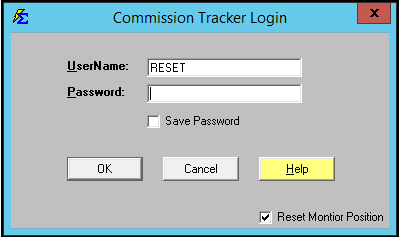
- In the User Name field, type:
RESET(must be all caps). - Leave the password field blank.
- Click OK.
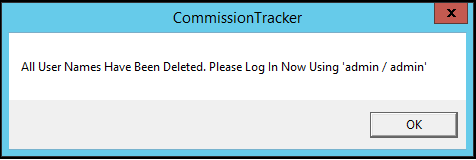
- Confirm the prompt to reset the security system.
| Action | Result |
|---|---|
| Enter "RESET" | All custom users are deleted. |
| New Login | Use admin / admin to get back in. |
Best Practices for Security
- ✅ Change the Default: Never keep the default
adminorpasswordcredentials active after setup. - ✅ Individual Logins: Create a separate login for every employee to track who makes changes to policies or payments.
- ✅ Backup Regularly: Ensure you have a recent backup before performing a security
RESET.