Policy Information Section
Overview
The Policy Information section captures the essential characteristics of a policy. While much of this data remains constant, several fields are "Term-Specific," meaning they can change each time a policy renews to reflect new contract dates or status updates.
📅 The Power of the Term Effective Date
The Term Effective Date is the most critical field in this section. It serves as the "anchor" for your entire commission schedule:
-
It determines the Billing Date of your very first expected payment.
-
It sets the starting point for the policy's current active year.
⏳ Understanding Term Lengths & Renewals
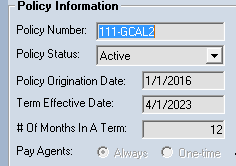
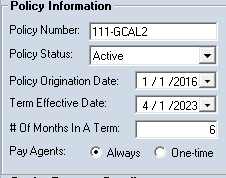
The # of Months In A Term field is used by the system to automatically calculate your Renewal Date. This ensures your reports accurately reflect when a policy is up for a new contract.
Example 1: 12-Month Standard Term
-
Term Length: 12 Months
-
Effective Date: January 1, 2023
-
Schedule: Payments are expected from January through December.
-
Next Renewal: January 1, 2024.
Example 2: 6-Month Short Term
-
Term Length: 6 Months
-
Effective Date: January 1, 2023
-
Schedule: Payments are expected from January through June.
-
Next Renewal: July 1, 2023.
📋 Field Definitions
| Field Name | Description |
|---|---|
| Policy Number | The unique identifier for the policy. |
| Policy Status | Current state (Active, Inactive, Pending, etc.). |
| Origination Date | The original date the very first term began. |
| Term Effective Date | The start date for the current term being viewed. |
| # Of Months In A Term | Duration of the contract (usually 12, 6, or 1). |
| Pay Agents | Toggle to enable or disable commission payouts for this policy. |
| Primary Agent | The lead agent assigned to this policy. |
💡 Tips for Success
- ✅ Check Your Dates: Ensure the Term Effective Date matches the carrier's records exactly, as this dictates when the system looks for money.
- ✅ Monitor Renewals: Use the Renewal Date on your reports to proactively reach out to clients before their policy expires.
- ⚠️ Term Logic: Remember that if you change the Primary Agent or Policy Type in the current term, it will not automatically change that information in past terms. This preserves your historical audit trail.
Still Need Help?
Are you looking to change information across multiple policies at once? Visit our Update All Policies guide.