# of Payments Paid In Advance
Overview
An Advance occurs when a carrier pays several months of commission upfront rather than waiting for the client to make each monthly premium payment. This setting allows Commission Tracker to accurately predict your cash flow and reconcile large initial commission checks.
📅 How Advances Work (The 9-Month Example)
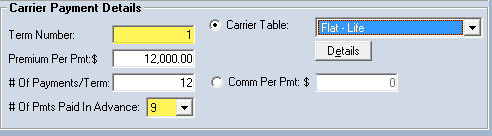
In many Life insurance contracts, carriers pay a 9-month advance. This means the system expects one large payment followed by a "waiting period" before regular monthly payments resume.
Example Scenario:
- Policy Effective Date: 1/1/2020
- Payments per Term: 12 (Monthly)
- Payments in Advance: 9
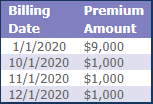
| Billing Date | Payment Type | Status |
|---|---|---|
| 1/1/2020 | Advance (9 Months) | Paid Upfront |
| 2/1/2020 — 9/1/2020 | None | Covered by Advance |
| 10/1/2020 | As-Earned (1 Month) | Monthly Payment Resumes |
| 11/1/2020 | As-Earned (1 Month) | Monthly Payment |
| 12/1/2020 | As-Earned (1 Month) | Final Term Payment |
🔄 Renewal Behavior: The "Reset" Rule
When a policy reaches its renewal date and a new term is created, Commission Tracker follows standard industry logic: Advances are typically for New Business only.
⚠️ The Reset Logic:
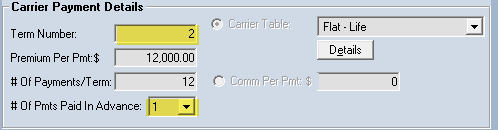
- Term 1 (New Business): Uses the Advance number you entered (e.g., 9).
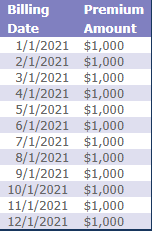
- Term 2+ (Renewals): The system automatically resets the # of Payments Paid in Advance to 1.
- Result: The policy moves to a standard "As-Earned" monthly schedule (12 payments, no advance) for all subsequent years.
💡 Tips for Success
- ✅ One-Time Setup: If your Carrier Table is set to a 12-month advance, every new policy attached to that table will inherit that advance automatically.
- ✅ Verify "As-Earned" Dates: If you are using a 9-month advance, don't expect to see another payment for that policy until the 10th month of the term.
- ❌ Manual Overrides: If you have a rare case where a carrier pays an advance on a renewal, you will need to manually update the # of Payments Paid in Advance on the New Term after the renewal is processed.