Parent Company & Sub-Client Structure
Overview
The Parent Company feature allows you to group multiple subsidiaries or "sub-clients" under a single umbrella entity. This hierarchical structure is ideal for managing corporate accounts with various branches or divisions.
🏗️ Structural Rules
To maintain data integrity, Commission Tracker follows a strict rule regarding how client records are organized.
CRITICAL RULE: The "One or the Other" Logic A client record can have either Policies or Sub-Clients attached to it. It cannot have both at the same time.
How to set up a Parent Company:
- Clear Existing Policies: If your intended "Parent Company" already has policies, you must move them to another client record first.
- Assign Subsidiaries: Once the parent record has no policies, you can begin attaching sub-clients to it.
- Attach Policies to Subs: All individual insurance policies should be attached to the specific Sub-Client record, not the Parent.
🖼️ Interface Guide
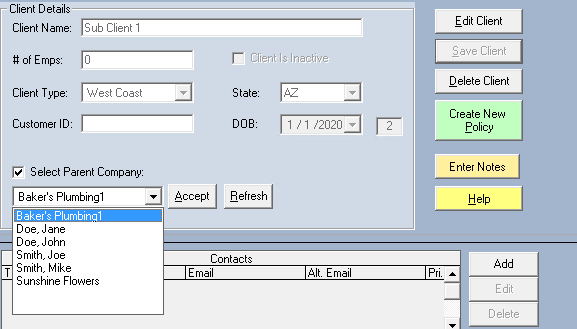
Setting the Hierarchy
On the Client screen, you can designate the hierarchy by selecting the appropriate Parent Company from the dropdown menu for any subsidiary.
Viewing the Group
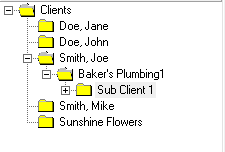
Once configured, the Parent Company record provides a consolidated view of all associated sub-clients.
⚠️ Important Considerations
- Reporting: This structure allows you to view the total volume of business across an entire organization while keeping individual subsidiary data separate.
- Data Cleanup: If you find you cannot add a sub-client to a company, double-check the "Policies" tab of that company; even one inactive policy will block the parent-client relationship.
- Consistency: Ensure you name your Parent and Sub-Client records clearly to avoid confusion during search and reporting.
💡 Tips for Success
- ✅ Standardize Naming: Use a naming convention like "ABC Corp (Parent)" to make searching easier.
- ✅ Check for Policies First: Before attempting to build a hierarchy, run a quick check to ensure your "folders" (Parent records) are empty of policy data.
- ✅ Move, Don't Delete: If you need to turn a policy-holding client into a parent, use the Edit Policy tool to move their policies to a new sub-client record rather than deleting them.
Still Need Help?
Need help moving policies between client records? Visit our Editing Policies guide.