Policy Term Number List
Overview
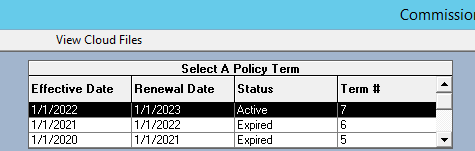
The life of a policy is tracked using the Policy Term Number List at the top of the Policy screen. A new policy term is created each time the policy is renewed.
📋 Features
-
Reverse Chronological Order: The newest term is always at the top of the list.
-
Visible Data: Displays the Effective Date, Renewal Date, Policy Status, and Policy Term Number for every stage of the policy's life.
-
Historical Access: Allows you to view the Payment History or post payments to previous terms even after a policy has renewed.
💡 Best Practices
- ✅ Accurate Posting: Always verify that the correct term is highlighted before manually receiving payments.
- ✅ Data Retention: Keep all terms in the system to maintain a complete audit trail of the client's history with your agency.