Revenue Group
Overview
Revenue Groups provide a flexible way to categorize policies for financial reporting. They are used to aggregate revenue across multiple Policy Types or to track income by custom sectors like lead source or market segment.
⚙️ Management
- Setup: Found under Tools → Edit Revenue Group.
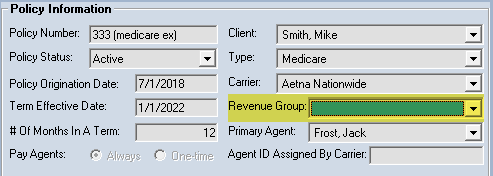
- Assignment: Assign a group to any policy on the main Policy screen.
- Reporting: Run the Commissions by Revenue Group report to see totals.
📊 Example Use Cases
- Aggregation: Combine various "Group Health" policy types into one "Group Health Insurance" Revenue Group.
- Analysis: Group policies by "Referral Source" to see which partners generate the most revenue.
💡 Best Practices
- ✅ Think Big Picture: Use Revenue Groups for high-level categories that help with agency-wide decision making.
- ✅ Clean Data: Periodically review your Revenue Group list in the Tools menu to remove any groups that are no longer in use.