Agent Address
The Agent Address section allows you to record the physical or mailing address for an agent. Maintaining accurate address data is essential for agency records and ensures that any physical correspondence or tax documents are sent to the correct location.
When to Use This Section
Update or complete this section when:
-
Onboarding a New Agent - Finalizing the profile after entering Contact Information.
-
Processing Relocations - Updating records when an agent or agency partner moves offices.
-
Tax Preparation - Ensuring the address on file matches the agent's current legal residence for year-end reporting.
Adding or Editing an Address
The address form is located within the Agent profile. It includes standard fields for street address, city, state, and zip code.
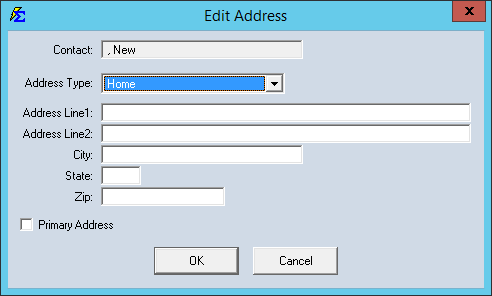
Step-by-Step Instructions
- Locate the agent in the Agent List.
- Click the Edit icon (or double-click the agent) to open their profile.
- Navigate to the Address tab or section.
- Enter the Street Address, City, State, and Zip Code.
- Click Save to update the record.
What Happens When You Save
- The address is linked to the Agent’s unique ID in the database.
- This information is automatically pulled into reports that include agent contact details.
- If you use the ACE Email Setup for digital statements, this physical address remains on file for secondary verification.
Troubleshooting
Q: Can I store multiple addresses for one agent (e.g., Home and Office)? A: The system is designed to hold one primary mailing address per agent profile. Most agencies prefer to use the address where commission checks or tax documents should be sent.
Q: Does updating the address here change the address on existing policies? A: Yes. Because the address is tied to the Agent profile, any report that pulls "Agent Address" will reflect the updated information across all policies assigned to them.
Need help? Contact support@commission-tracker.com