Agent Commission Advances
The Agent Commission Advances feature allows an agency to pay an agent a commission before a carrier payment has actually been received. It can also be used to record deductions, such as office rentals or marketing fees, by entering a negative amount.
When to Use This Feature
Use the Agent Advance button when you need to:
-
Pre-pay Commissions - Pay an agent for a policy before the carrier statement arrives.
-
Record Fees - Deduct office, marketing, or technology fees from an agent’s earnings (using a negative amount).
-
Issue Special Payments - Provide one-time bonuses or adjustments that aren't tied to a specific carrier receipt.
Accessing Agent Advances
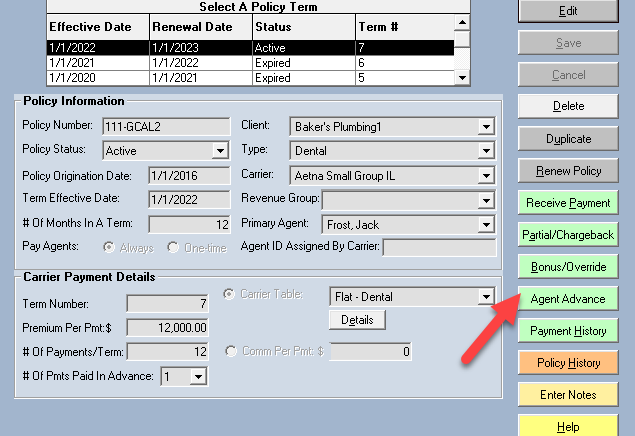
- Open the specific Policy for which you want to issue an advance.
- Click the Agent Advance button in the toolbar.
Form Fields & Logic
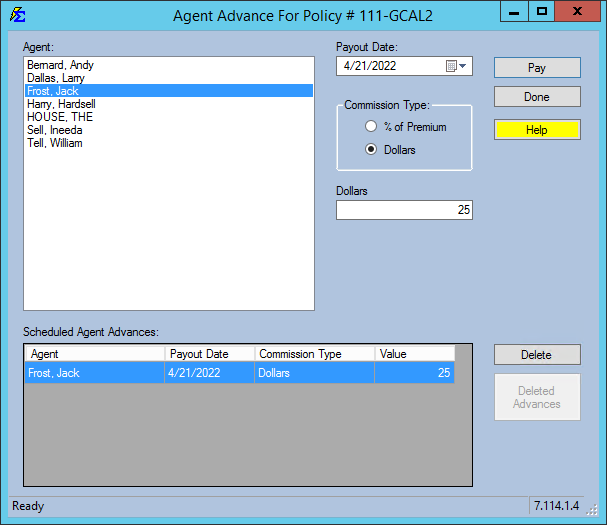
You have the flexibility to pay any agent, any amount, on any day.
Calculation Options
- Flat Amount - Enter a specific dollar amount to be paid or deducted.
- Percentage of Premium - Calculate the advance as a percentage of the Estimated Premium defined on the policy screen.
Reconciliation Logic
For every Agent Advance paid to an agent, an opposite but equal amount is applied to "The House" agent account. This ensures your agency's books remain balanced—the money paid to the agent is "sourced" from the agency's retained earnings.
Step-by-Step: Creating an Advance
- Navigate to the desired policy.
- Click Agent Advance.
- Select the Agent from the dropdown.
- Enter the Amount (use a negative sign for deductions).
- Set the Receive Date (this determines which pay period the advance appears in).
- Click Save.
Viewing or Editing
To View or Edit an existing Agent Advance later, you must select the SAME Term Number on the policy that was used when the advance was originally created.
What Happens When You Save
- A transaction is created with the type "AA" (Agent Advance).
- The payment is immediately available to be pulled into reports based on the Receive Date you selected.
- An offsetting entry is made to "The House" to keep agency totals accurate.
Reporting on Advances
Advances appear on the Agent Commissions Earned report as transaction type "Agent Adv" or "AA".
- Filtering: You can use the "Transaction Type" filter on the report screen to list only advances if you need to audit them separately from regular commissions.
- Payment History: Note that these payments will not appear in the regular Payment History screen because they are not tied to a carrier receipt.
Troubleshooting
Q: Why doesn't the advance show up on my agent's statement? A: Check the Receive Date of the advance. Ensure the date range you selected when running the Agent Commissions Earned report includes that specific date.
Q: Can I use this for chargebacks? A: Yes. Entering a negative amount will reduce the agent's total earnings for the period, effectively acting as a manual chargeback.
Need help with advances? Contact support@commission-tracker.com