Agent Phone Number
The Agent Phone Number section allows you to store essential voice contact details for each agent. Maintaining updated phone records ensures that agency staff can quickly reach producers regarding commission discrepancies, policy updates, or administrative needs.
When to Use This Section
Complete or update this section when:
-
Finalizing Agent Setup - Completing the profile after entering the Agent Address.
-
Updating Contact Records - Ensuring the agency has the most current mobile or office number on file.
-
Directory Maintenance - Building a reliable internal directory for agency communication.
Adding or Editing a Phone Number
The phone number field is located within the Agent profile. It is designed to hold the primary contact number for the agent.
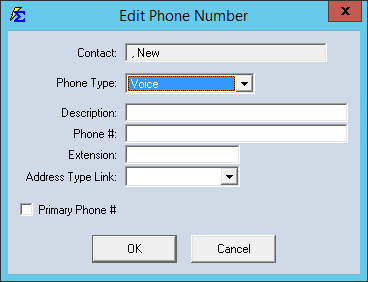
Step-by-Step Instructions
- Locate the agent in the Agent List.
- Click the Edit icon (or double-click the agent) to open their profile.
- Navigate to the Phone Number field.
- Enter the digits (the system will automatically format the number based on your Options settings).
- Click Save to update the record.
What Happens When You Save
- The phone number is permanently linked to the Agent’s unique record.
- This information is instantly available in the Agent List Report.
- Any custom report or export that includes "Agent Phone" will reflect the updated data.
Troubleshooting
Q: Can I store multiple phone numbers (e.g., Cell and Office)? A: The primary agent screen is designed for the main contact number. If you need to store secondary numbers, many agencies utilize the "Notes" section or enter them in the Agent Contact Info.
Q: Does the phone number appear on the agent's commission statement? A: Most ACE Report formats focus on financial data and address, but some custom header formats can be configured to include the agent's phone number.
Next Step: Now that the profile is complete, you can begin defining the Agent Commission Splits.
Need help? Contact support@commission-tracker.com