Carrier Address
The Carrier Address section stores the physical or mailing location of the insurance provider. Maintaining accurate address data is essential for agency records, physical correspondence, and identifying specific regional carrier offices.
When to Use This Section
Complete this section during the initial setup of a carrier or when:
-
Updating Office Locations - Ensuring the agency has the current mailing address for commission inquiries.
-
Differentiating Regional Offices - Recording specific addresses for different carrier branches (e.g., a regional processing center vs. a corporate headquarters).
-
Standardizing Records - Ensuring all carriers in your database have a complete profile for professional reporting.
Adding or Editing the Address
The address fields are located within the Carrier Profile. You can enter the street address, city, state, and zip code.
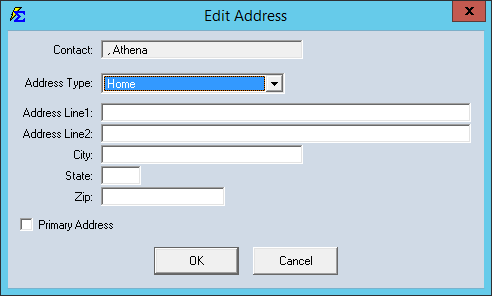
Step-by-Step Instructions
- Navigate to the Carrier screen and select the carrier you wish to edit.
- Click the Edit icon (or double-click the carrier) to open the profile.
- Locate the Address fields.
- Enter the Street Address, City, State, and Zip Code.
- Click Save to update the record.
What Happens When You Save
- The address is permanently linked to the carrier’s unique record.
- This data is automatically pulled into the Carrier List Report.
- The address information will be available for any custom labels or mail-merge exports used for carrier correspondence.
Troubleshooting
Q: Do I need to enter an address for every carrier? A: While not strictly required for commission tracking, it is a best practice for agency data integrity. It helps differentiate carriers with similar names but different locations.
Q: Can I store multiple addresses for one carrier? A: The primary carrier screen is designed for the main contact address. If you need to store secondary addresses (like a separate claims or billing office), we recommend using the Carrier Notes section.
Next Steps:
Need help with carrier management? Contact support@commission-tracker.com