Client Phone Number
The Client Phone Number section stores the primary voice contact details for the client. Accurate phone records are essential for agency staff to provide efficient service and for populating contact directories in your Client Reports.
When to Use This Section
Input or update the phone number during the initial client intake or when:
-
Updating Primary Contact Info: Ensuring your team can reach the client for renewal discussions or policy changes.
-
Recording Office Extensions: Capturing specific extension numbers to bypass automated phone menus and reach the correct contact directly.
-
Data Standardization: Maintaining a complete profile so that exports for external CRM or dialer tools are accurate.
Adding the Phone Number and Extension
The phone and extension fields are located on the main Client profile screen.
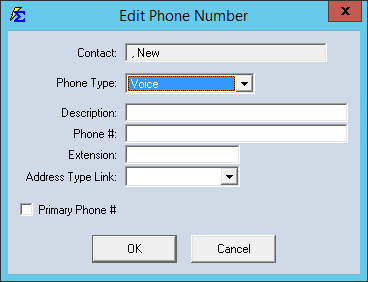
Step-by-Step Instructions
- Navigate to the Client screen and select the client you wish to update.
- Locate the Phone Number field and enter the digits; the system will apply standard formatting automatically based on your global settings.
- Enter the Extension in the dedicated field if applicable.
- Click Save to update the record.
What Happens When You Save
- Report Integration: The phone number and extension are automatically included in the Client List Report.
- Searchability: Having a populated phone field allows for more robust data audits and ensures your client profiles meet agency "completeness" standards.
- Unified View: This number serves as the primary contact for the client, regardless of how many individual Policies are linked to their record.
Troubleshooting
Q: Can I enter multiple phone numbers (e.g., Cell and Office)? A: The main screen is designed for the primary contact number. For additional numbers, we recommend using the Client Notes section to ensure all contact options are preserved.
Q: How do I format international numbers? A: The phone field is optimized for standard North American formatting. For international numbers, enter the digits without punctuation, or use the Client Notes if the field length is insufficient.
Next Steps: - Client Contact Info - Client Address - Parent Company / Sub Client
Need help with client data? Contact support@commission-tracker.com