Policy Status
Overview
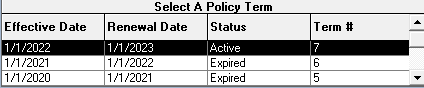
The Policy Status indicates the current standing of a specific policy term. Because status is associated with the Term, each term can have a different status.
🚦 Status Definitions
- Active: Indicates the current, in-force term.
- ActiveNew / ActiveRewrite: Optional manual statuses for new or renewed terms.
- Expired: Automatically set by the system the day after the Renewal Date.
- Inactive: For cancelled policies where trailing payments are still expected.
- Prospect: For policies not yet sold.
- Terminated: For cancelled policies where no further payments are expected.
📅 Termination Logic & A/R
Policies marked Terminated use the Termination Date to filter the Accounts Receivable report:
-
Billing Date > Termination Date: Hidden from A/R.
-
Billing Date <= Termination Date: Appears in A/R (Expected).
🖼️ Term Example
💡 Best Practices
- ✅ Verify Dates: Ensure the Term Renewal Date is correct to maintain the proper "Active" status.
- ✅ Manage Revenue: Use the Termination Date to accurately reflect what is still owed to the agency versus what has been cancelled.