Saved Report Settings
Save the filters you set on a report under a name, and pick that name next time instead of setting every filter again. Saved settings are shared by everyone in your company who uses that report. They are also what Send Reports emails: tick the saved settings to send, and the reports go out as PDF or Excel attachments.
Available on every report's filter screen, from the Book of Business and Agency Payments Received to the Policy List Report, Agent Commissions Earned and the list, audit and comparison reports.
Newer versions only
This is in newer versions of Commission Tracker. If you do not see it, your server has not been updated yet.
💡 Why Use This
Use saved settings when:
- You run the same report every cycle — Set the filters once, save them as "Monthly BoB", and pick that name each month.
- Several people run the same report — One person saves the settings; the whole company can pick them, so everyone runs the report the same way.
- A report has many filters — Carriers, agents, clients, statuses, a date range and a grouping are a lot to redo by hand.
🗺️ How to Access
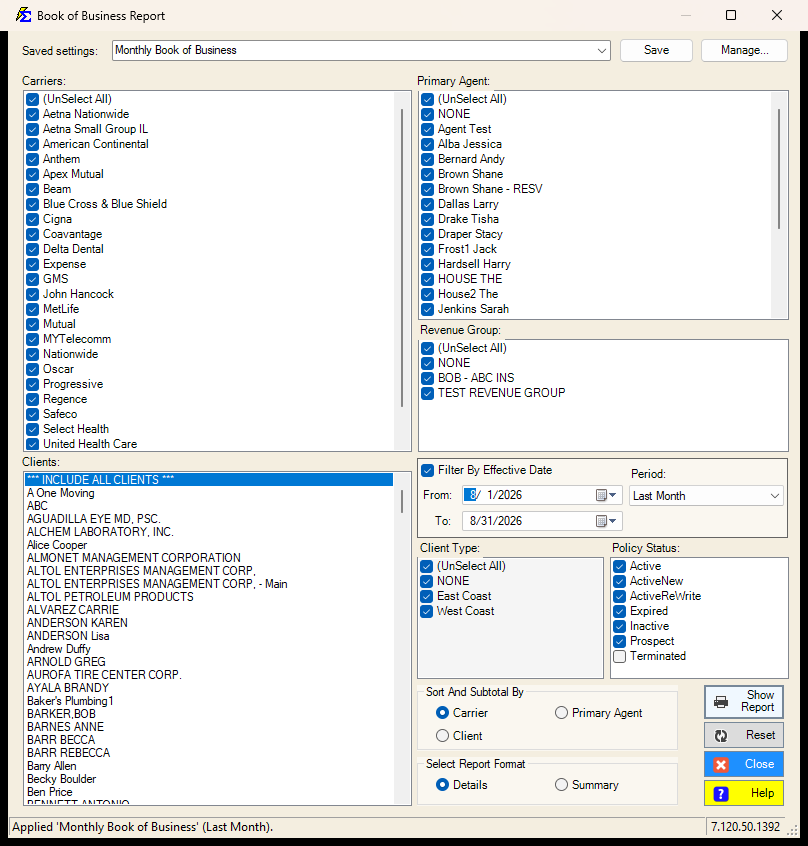
The Saved settings row is at the top of the report's filter screen.
Saving Your Settings
- Set the filters, dates and options the way you want them.
- Type a name in the Saved settings box (for example
Monthly BoB). - Click Save.
If a saved setting with that name already exists, you are asked whether to replace it.
Every list needs a selection
A setting cannot be saved while a required list (agents, carriers, clients, revenue groups, statuses) has nothing checked, or while no grouping or report format is chosen. The message tells you which one.
Using a Saved Setting
- Open the report.
- Pick the name from the Saved settings list. The filters fill in.
- Click Show Report as usual.
Picking a saved setting only fills the screen. You can still change anything before you run the report.
Click Reset to put the whole screen back to the way it opens, with no saved setting selected. Reset does not delete anything.
The report remembers your last saved setting
The next time you open the report, the last saved setting you used is filled in for you. If it has since been deleted, the report opens with its default filters and the status bar says so. The report no longer remembers individual filter changes you did not save.
Dates and the Period Box
Next to the date range there is a Presets box (on Accounts Receivable, Book of Business and the Policy List Report it is called Period): This Month, Last Month, This Quarter, Last Year, and so on. Agency Payments Received Annualized has no date range; it has a Period Start month instead.
- Choose a period and the From and To dates fill in for you.
- A saved setting remembers the period, not the dates. "Last Month" saved in March means February; picked in June it means May.
- Choose Custom (or just edit the dates) to save a fixed date range instead.
- The Policy List Report has three date ranges (Origination, Effective, Renewal) and one Period box under them. The period fills every ticked range; to give the ranges different fixed dates, use Custom and type them.
- To nudge a date, click its month, day or year and roll the mouse wheel; each notch steps that part up or down.
What Is Remembered
- Which carriers, agents, clients, client types, revenue groups and policy statuses are selected.
- All stays all. If every carrier was selected when you saved, a carrier added later is included automatically.
- The period, or the fixed dates when the period is Custom.
- The grouping and the report format.
- On Agency Payments Received, also the date choice (Receive Date, Billing Date or All Payments), the import session, the months of imports, the number ranges, the check number and the transaction types.
- On the Policy List Report, also which of the three date ranges are ticked, the policy types and the sort. The import session pick is not saved.
- On Agent Commissions Earned, also the date choice, the $0 commissions box, the Policy Origination Date filter (saved with its typed dates), the number ranges, the check number, the transaction types and the report format.
- On Accounts Receivable, also the A/R Cut Off Date ("today" when left at today's date, so it moves with the calendar; any other date as typed), the months overdue and the $0 expected commission box.
- On Agency Payments Received Annualized, the period month: saved as "this month" or "last month" when that is what you picked, so it moves with the calendar; any older month stays fixed. Also the date choice, the customer ID, the group-by, the report format, the three custom columns and the transaction types.
- On Payment Discrepancy, also the date choice (Receive Date or Billing Date), the tolerance in full (Commission or Premium, Percent or Dollar, and both amounts) and the two include boxes.
- On Clients by Policy, the six lists (carriers, primary agents, policy types, policy statuses, carrier tables, revenue groups), the term number range, the client status boxes and the grouping. It has no dates.
- On Agency vs Agent Commission Comparison, the same items as Agent Commissions Earned (the date choice, the $0 commissions box, the Policy Origination Date filter with its typed dates, the number ranges, the check number, the transaction types) and the report format.
Items that no longer exist
If a saved agent or carrier has since been deleted or merged, it is skipped and a message lists what was skipped. If nothing is left in that list, all items are selected instead so the report can still run.
Manage: Rename or Delete
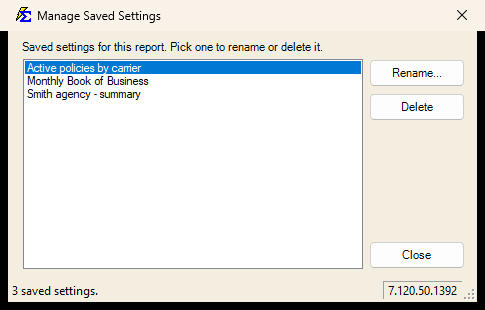
Click Manage... to see every saved setting for this report. Pick one to Rename it or Delete it. Deleting removes it for everyone in the company.
🔧 Troubleshooting
The Saved settings row is greyed out. The status bar says why. Usually the shared settings database could not be reached; the report itself still works. Try again in a minute or contact support if it persists.
I picked a setting but the dates look different from when I saved it. That setting uses a period such as Last Month, so the dates move with the calendar. Save it with Custom dates if you want them fixed.