Agent Types
Agent Types are customizable labels used to categorize agents for high-level filtering and reporting (e.g., "Full-Time," "Broker," "Manager"). Assigning an Agent Type to each agent profile lets you group and compare producers across reports.
💡 Why Use This
Agent Types give you a flexible, agency-defined way to segment your producer roster. Common examples include:
- Full-Time vs Part-Time agents
- Brokers vs Managers
- In-House vs External producers
Use whatever groupings make sense for your agency — Agent Types appear as filters in reports, so they directly shape how you analyze your book of business.
🗺️ How to Access
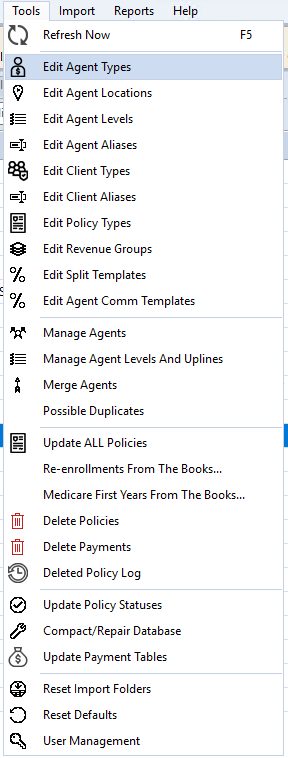
Option 1 — From the Tools menu:
- Navigate to the Tools menu.
- Select Edit Agent Types.
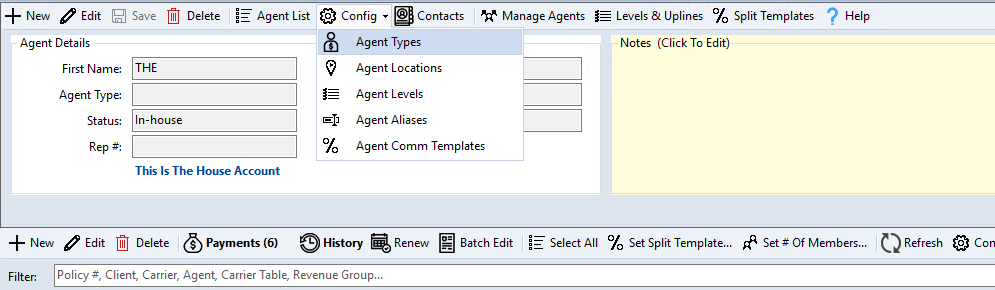
Option 2 — From the Agent screen:
- Open any agent profile.
- Click the Config dropdown.
- Select Agent Types.
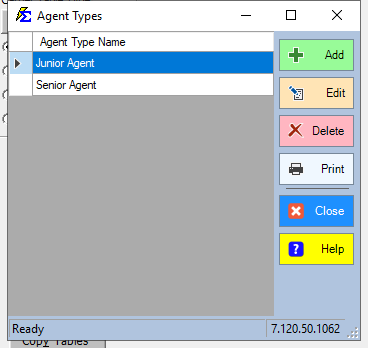
Managing Agent Types
The Edit Agent Types screen displays your current list of Agent Types. From here you can add, edit, or delete types.
Adding a New Agent Type
- Click Add.
- Enter a name for the Agent Type (maximum 225 characters).
- Click Save.
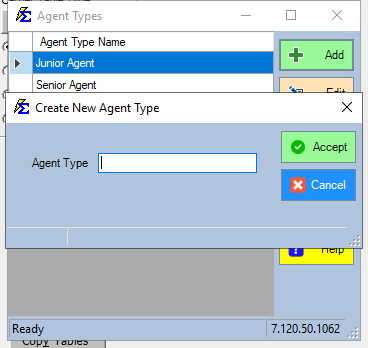
The new type is immediately available in the Agent Type dropdown on all agent profiles.
Editing an Existing Agent Type
- Click the Agent Type name you want to change.
- Edit the name directly.
- Click Save.
Renaming Updates Everywhere
Renaming an Agent Type updates it across all agent profiles already assigned to that type.
Deleting an Agent Type
- Select the Agent Type you want to remove.
- Click Delete.
Cannot Delete an In-Use Type
You cannot delete an Agent Type that is currently assigned to one or more agents. Reassign those agents to a different type first, then delete.
🔧 Troubleshooting
The Agent Type I need doesn't appear in the dropdown on the agent profile. Go to Tools → Edit Agent Types and confirm the type was saved. If it was just added, close and reopen the agent profile to refresh the dropdown.
The Delete button is grayed out or returns an error. The Agent Type is still assigned to at least one agent. Use the Agent List to find agents with that type, reassign them, then return to Edit Agent Types to delete it.
🔗 Related Topics
Need help? Contact support@commission-tracker.com