Agent Book of Business Report
The Agent Book of Business report totals the commissions earned in a period and credits them to agents one of five ways: to the primary agent (as commissions earned, or as the agency payments received), to every agent on the split (an equal share, or their relative share of the production), or by client. Use it to see what each agent's book produced in a period.
💡 Why Use This
Use this report when:
- Reviewing agent production — See what each agent's policies earned in a month, a quarter or a year.
- Comparing credit methods — The same period by primary agent and by split share shows how much of an agent's book is shared.
- Reviewing one revenue group or one agent — Filter to a revenue group, or to a single agent, for a focused view.
- Working a client's history — By Client lists every agent who earned on each client and how much.
🗺️ How to Access
- Navigate to Reports → Agent → Agent Book of Business.
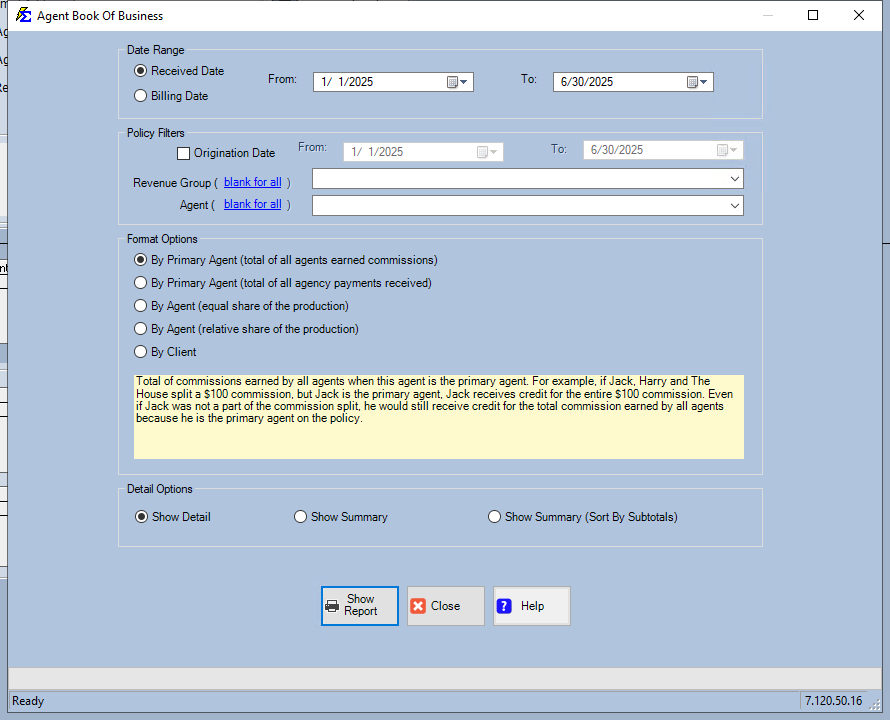
- Set the Date Range, any Policy Filters, a Format and a Detail option.
- Click Show Report.
Filters
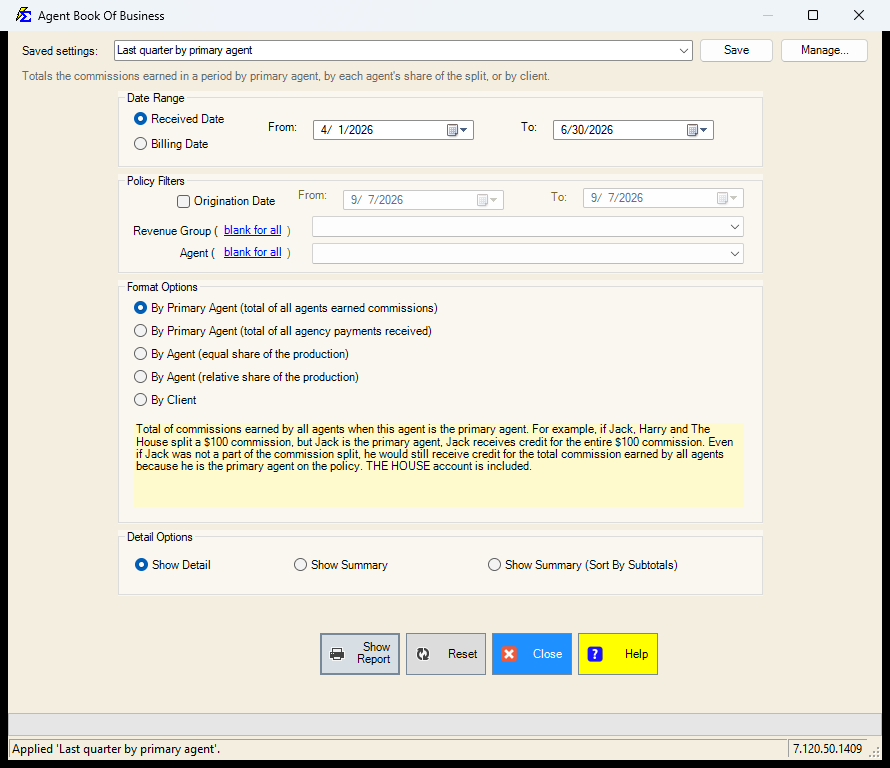
- Date Range — the period, by Received Date (when the carrier payment was received) or Billing Date (the payment's billing month). The screen opens on last month to today.
- Origination Date — tick the box to keep only policies whose effective date falls in the From/To range.
- Revenue Group, Agent — pick one, or leave the row blank for all.
Format Options
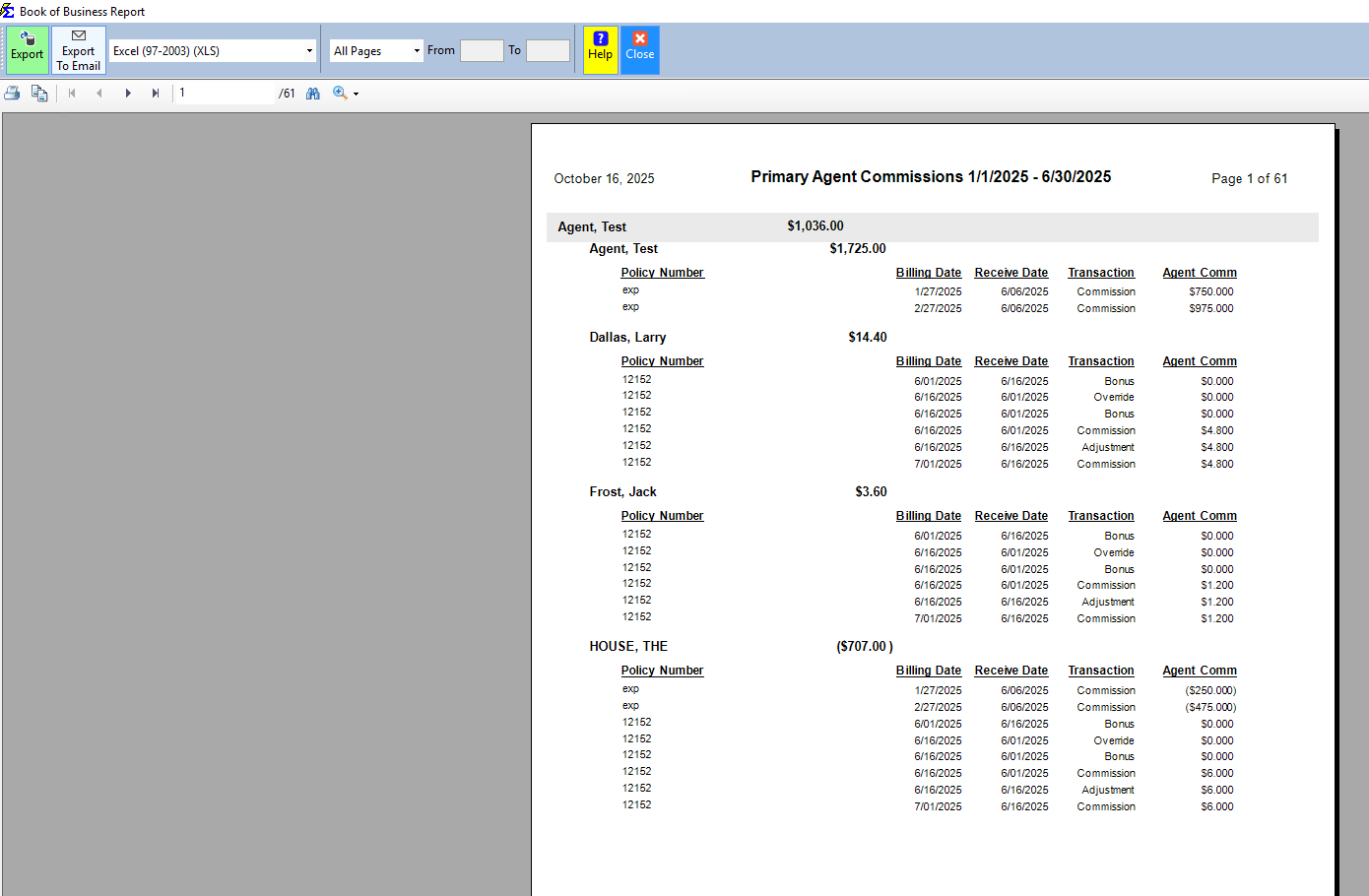
- By Primary Agent (total of all agents earned commissions) — every agent's commission on a policy is credited to that policy's primary agent. THE HOUSE is included.
- By Primary Agent (total of all agency payments received) — the agency payment itself is credited to the primary agent; the split table is ignored.
- By Agent (equal share of the production) — each agent on the split is credited with an equal share of the premium. THE HOUSE is excluded.
- By Agent (relative share of the production) — each agent on the split is credited with their share of the premium in proportion to their split percentage. THE HOUSE is excluded.
- By Client — every agent who earned commissions on each client, and how much.
The box under the radios explains the selected format with an example.
Detail Options
Show Detail, Show Summary or Show Summary (Sort By Subtotals). The two By Primary Agent formats have one layout each, so the detail choice is greyed out for them.
Saved Settings
The filter screen has a Saved settings row at the top. Set the period, the filters, the format and the detail the way you run this report, type a name and click Save; next time, pick the name and the screen fills in. Saved settings are shared by everyone in your company, and the report remembers the last one you used.
- Everything on the screen is remembered: the date radio and its From/To dates, the origination filter and its dates, the revenue group, the agent, the format and the detail option.
- The dates come back exactly as saved; there is no period chooser on this screen.
- A revenue group or agent that no longer exists is dropped when the setting is applied (the row goes back to blank for all), and the screen tells you.
- Reset puts the screen back to the way it opens: Received Date, last month to today, no origination filter, all revenue groups and agents, By Primary Agent (total of all agents earned commissions), Show Detail.
See Saved Report Settings for saving, renaming and deleting.
Report Results
The report opens in the viewer grouped by agent (or by client), with the detail or summary you chose.
🔧 Troubleshooting
An agent is missing from the report. Under the two By Agent formats an agent appears only when they are on a policy's commission split for a payment in the period. Under the By Primary Agent formats they must be the policy's primary agent. THE HOUSE is excluded from the By Agent formats.
The totals differ between formats. That is the point of the formats: earned commissions totals the agents' commissions, agency payments received totals the carrier payments, and the two By Agent formats share the premium, not the commission.
"No records found for the selected date range." No carrier payment was received (or billed) in the period. Widen the dates or switch between Received Date and Billing Date.
🔗 Related Topics
- Book of Business — Agency-wide valuation with carrier and client grouping options.
- Agent Commission Splits Report — Audit how commissions are allocated across policies.
- Agent Commissions Earned — Each agent's commission statement for a period.
- Agent List — Directory of all agents in the system.
Need help? Contact support@commission-tracker.com